What the key icon on your Android screen means
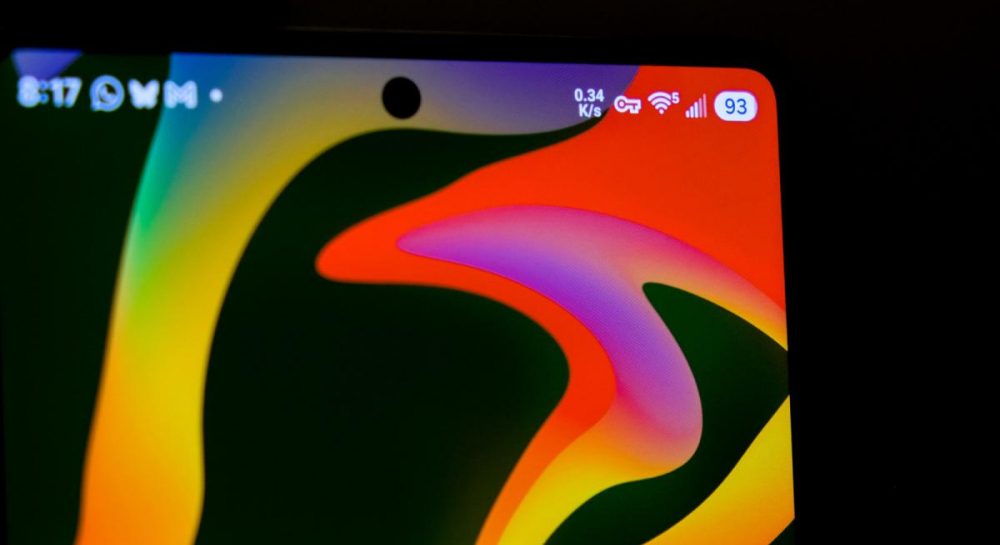
The appearance of a key icon in the Android status bar often confuses users. We explain what this symbol means and how it relates to your privacy.
 💡Tech
Photo: UNIAN
Key points
- The key icon indicates an active VPN service
- The icon confirms internet traffic encryption
- On most devices, the icon cannot be hidden for security reasons
Android smartphone users often notice an unfamiliar key-shaped symbol in the top status bar. It is important to understand that this indicator is not a sign of a technical malfunction or unauthorized access to your device.
Purpose of the VPN indicator
In fact, the key icon indicates that a VPN service is active. This means your internet traffic is routed through a secure tunnel, and your real IP address is hidden from third-party resources. This technology is particularly useful when using public Wi-Fi networks, as it encrypts data and protects it from interception.
As long as the key is displayed on the screen, the system is signaling that encryption is active. If the icon disappears, it indicates that the VPN connection has been dropped. Most Android developers do not allow users to hide this icon to ensure that users can monitor their network security status in real time.
Managing the icon display
The only way to completely remove the icon is to disable the VPN service itself in the connection settings. The exception is Samsung Galaxy smartphones, where users can use the Good Lock module to customize the notification panel and hide this indicator without disabling the protection.
Source UNIAN — unian.ua/techno/gadgets/znachok-klyucha-u-paneli-na-android-za-shch… ↗
Read next
 🩺Health
Scientists Identify Critical Age Periods When Human Immunity Ages Fastest
A new scientific study has revealed that the human immune system does not age gradually, but rather in sharp leaps occurring around age 40 and after 60.
 🧠AI Analysis
Artificial Intelligence on the Frontline: How Ukrainian Ground Robots Are Moving Toward Autonomy
Ukraine's defense industry is actively integrating artificial intelligence into ground robotic systems to reduce operator dependency.
 🧠AI Analysis
New Geography of Maritime Threats: Incidents Involving Russian Vessels in Libya and the Baltic
An explosion on a Russian ship in the Libyan port of Benghazi and a fire aboard the cargo vessel Sparta II in the Gulf of Finland highlight the growing vulnerability of R…
 🧠AI Analysis
Destruction of Russian Corvette «Merkuriy» Near Libya: Details and Significance
A successful operation by Ukrainian defense forces near the Libyan coast has resulted in the sinking of the Russian corvette «Merkuriy», estimated at $350 million.
 🛡️Security
NATO Parliamentary Assembly: Russian October strikes killed over 500 civilians in Ukraine
During a speech at the NATO Parliamentary Assembly session, data on the consequences of massive Russian attacks in October was revealed. The death toll reached 534 civili…
 🛡️Security
Zelenskyy Reports on Updated Russian Strike Plans and Critical Energy Situation
Ukraine's Main Directorate of Intelligence has briefed the military-political leadership on updated plans for enemy strikes. The president emphasized that the most severe…